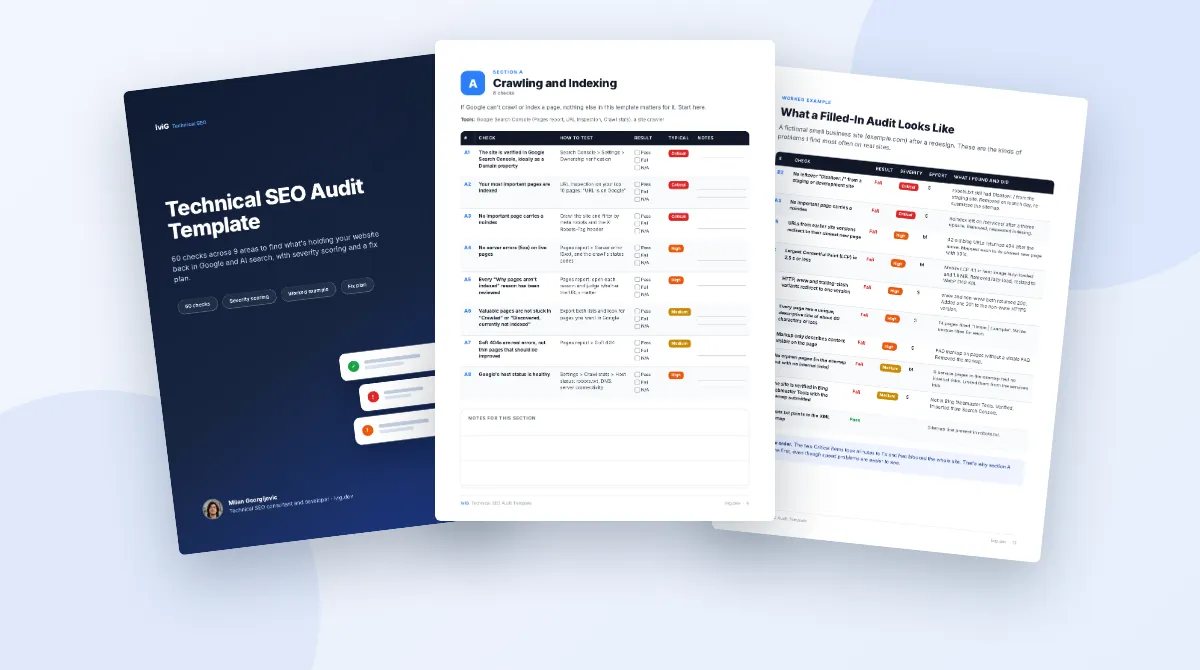
An SEO audit template is a checklist you work through to find what stops a website from being crawled, indexed and ranked, and in what order to fix it. This one is a free 16-page PDF with 60 technical checks in 9 areas, a test method for each, a typical severity, and a fix plan to fill in. It's the same structure I use when I audit client sites.
Enter your email and I'll send you the download link.

What's Inside
The checks run in the order that matters. If Google can't crawl or index a page, fixing its speed or markup won't help yet, so crawling and indexing come first.
| Section | Checks | What it covers |
|---|---|---|
| A. Crawling and indexing | 8 | Search Console setup, indexed key pages, stray noindex, server errors, the Page indexing report |
| B. Sitemaps and robots.txt | 7 | Blocked sections, leftover staging rules, sitemap status and contents |
| C. Canonicals and duplicate URLs | 6 | Self-referencing canonicals, HTTP and www variants, parameters, Google's chosen canonical |
| D. Redirects and status codes | 6 | 301 vs 302, chains, broken internal links, old URLs, real 404s |
| E. Internal links and structure | 6 | Click depth, orphan pages, crawlable navigation, anchor text |
| F. Titles, headings and basics | 6 | Titles, descriptions, H1s, alt text, HTTPS, mobile |
| G. Structured data | 5 | Organization, Article and breadcrumb markup, markup that matches the page |
| H. Core Web Vitals and speed | 8 | LCP, INP, CLS, the hero image, image sizes, third-party scripts, server response |
| I. AI search readiness | 8 | AI crawler access, Bing, content in the HTML, entity information, how AI tools describe you |
After the checks: a page of filled-in example results, a blank fix plan, and a quick-reference page with the Core Web Vitals thresholds, status codes, canonical rules and the main AI crawlers.
How the Template Works
- Run each check. Every row says how to test it with free tools: Google Search Console, PageSpeed Insights, a crawler such as Screaming Frog's free version, and my free TechSEO Inspector and Sitemap Scout.
- Mark Pass, Fail or N/A, and write the URL you tested in the notes so you can retest it.
- Score each failure. Each check shows a typical severity: Critical, High, Medium or Low. Adjust it for your site: a broken link on your main service page matters more than one in an old post.
- Plan the fixes. Copy failures into the fix plan, rate the effort (S, M or L), and start with Critical items and high-impact quick wins.
Preview the Pages


Who It's For
- Business owners who want to know why their site isn't showing up or has stopped growing, before paying anyone.
- Developers and marketers who need a repeatable checklist after a redesign or site migration.
- Freelancers and agencies who want a clear structure for a client audit.
If you'd rather read the reasoning behind each area first, the SEO audit checklist guide explains what to look for and why. The template is the worksheet you fill in.
Rather Have Someone Run It for You?
My technical SEO audit ($255, 2-day delivery) covers every area in this template on your site, with evidence, impact and the exact fix for each issue. For a first look, request a free website review.
Request a free website reviewFrequently Asked Questions
Related Guides
- Read the full SEO audit checklist.
- See what an SEO audit costs.
- Fix pages that aren't indexed.
- Decide which AI crawlers to allow.

I'm a developer who moved into technical SEO. I trace search problems through crawling, rendering, indexing, templates, content and performance, then implement the fixes instead of handing over a generic export. Request a free website review and I'll review your site personally.