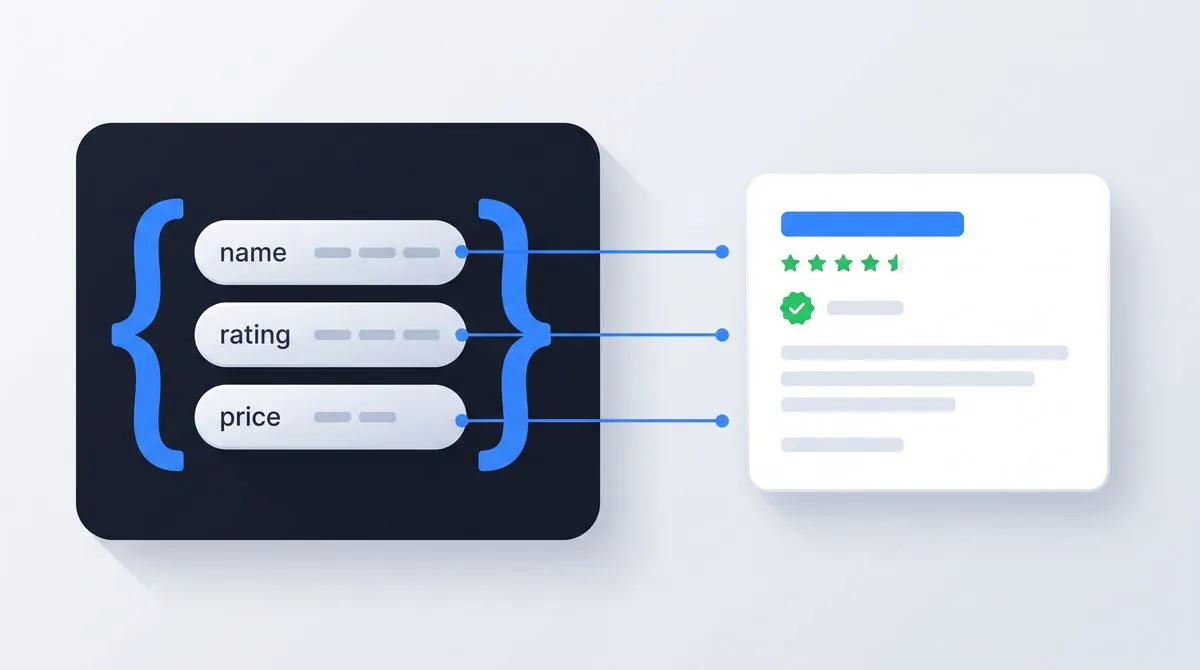
Schema markup is code, usually a small block of JSON-LD, that labels the content of a page in a shared vocabulary called structured data: this number is a price, this name is the author, this block is a review. Visitors never see it. Search engines read it, and it's what makes your pages eligible for rich results: the star ratings, product details, breadcrumbs and event listings that make a search listing bigger than two plain lines of text.
I read structured data on every audit I run, and most schema advice online has two problems. Half of it is outdated, still promising rich results Google removed years ago. The other half oversells it as a ranking trick, which it isn't. So this guide stays honest about both: what schema does, what it stopped doing, and where it's still one of the best returns on an hour of work in technical SEO.
What Schema Markup Actually Is
HTML tells a browser how content should look. It says nothing about what the content means. To a crawler, "4.8" on your page is just a string: a rating, a price, a version number, a shoe size. Schema markup removes the guesswork by labeling it explicitly.
The vocabulary lives at schema.org, a project Google, Microsoft and Yahoo launched together in 2011 so the whole industry would label things the same way. It has grown into a large dictionary: 823 types and 1,529 properties at last count, covering everything from recipes to medical trials. You'll use maybe five of them.
Here's a complete, working example. This block tells a search engine the page is an article, who wrote it, and when:
<script type="application/ld+json">
{
  "@context": "https://schema.org",
  "@type": "Article",
  "headline": "Your Article Title",
  "author": {"@type": "Person", "name": "Author Name"},
  "datePublished": "2026-07-20"
}
</script>
That's the whole trick. A script block of labeled facts, sitting invisibly in your HTML, saying in machine language what the page already says in human language. The two must match: Google's structured data policies require markup to describe content that's visible on the page, and nothing else.
What Schema Markup Does for SEO (and What It Doesn't)
Let's kill the biggest myth first: schema markup is not a ranking factor. Adding it won't move you from position 8 to position 3. Google's own documentation frames structured data as a way to understand page content and enable special result features, not as a ranking signal. Anyone selling schema as a rankings lever is selling you something else.
What it changes is presentation. Marked-up pages become eligible for rich results: the review stars, prices, cooking times, event dates and job details that expand a plain blue link into something bigger and more specific. Same position, more pixels, more information, more reasons to click. That's where the numbers in the tiles above come from. Rotten Tomatoes measured 25% higher click-through on marked-up pages. Nestlé measured 82% higher click-through on pages shown as rich results. Rakuten found users spending 1.5 times more time on pages arriving through them.
The honest hierarchy looks like this. If your page isn't indexed, schema is irrelevant (my indexing guide comes first). If your content doesn't answer the query, schema won't rescue it. And if your title and meta description are a mess, fix those before decorating them. Schema sits on top of that stack: it makes a listing that already earned its position work harder for the click.
Three Formats, One Sensible Choice: JSON-LD
Google supports three ways to write structured data: JSON-LD, microdata and RDFa. The official documentation recommends JSON-LD, and for once the recommendation is also the practical winner.
Microdata and RDFa weave attributes into your visible HTML tags, which means your markup is scattered across the template and every redesign risks silently tearing it. JSON-LD lives in one self-contained script block. You can read the whole thing at a glance, test it by copy-pasting into a validator, generate it from your CMS data, and update it without touching layout. Every block on this site is JSON-LD, and I haven't met a reason to use anything else on a new build in years.
Rich Results in 2026: What's Left, and What Google Took Away
This is where most schema guides quietly rot. Google has spent the last three years removing rich result types, and plenty of articles still recommend markup for features that no longer exist. The removals, with dates:
- HowTo rich results: gone. Google restricted them in August 2023 and removed them completely that September.
- Sitelinks search box: gone. The search-within-a-site box driven by SearchAction markup retired on November 21, 2024, because usage kept dropping.
- FAQ rich results: gone, and recently. The August 2023 change limited FAQ dropdowns to authoritative government and health sites. On May 7, 2026, Google dropped them entirely, for everyone. Any guide still promising FAQ dropdowns was written before that date.
In each case Google said the same thing: leaving the old markup in place causes no errors and no harm. You don't need to rip it out. You just shouldn't build new markup for dead features, and you should read every "schema increases clicks" case study with the calendar in hand.
Review features have their own restrictions: self-serving reviews of a LocalBusiness or Organization are not eligible for review stars, including embedded third-party reviews about your own business. Check Google’s review policies before adding ratings. Several other supported features remain useful:
Still shows in Google
- Product snippets: price, availability, review stars
- Review snippets on eligible types, subject to review policies
- Breadcrumbs shown in place of the raw URL
- Recipe cards with photos, ratings and times
- Event listings with dates and venues
- Job postings, video results, article info for news
- Organization details feeding knowledge panels
Retired by Google
- FAQ dropdowns, fully removed May 7, 2026
- HowTo step-by-step results, removed September 2023
- Sitelinks search box, retired November 2024
- Any new markup built only to chase these features
The Schema Types Worth Adding First
You don't need 823 types. For most sites the whole practical vocabulary is six or seven types, and there's a sensible order to add them in:
- Organization, on your homepage. Name, logo, URL, contact points, links to your real profiles. This is your identity card: it feeds knowledge panels and tells every machine reading your site who's behind it. If you're a local business with a physical address, use LocalBusiness instead; it inherits everything from Organization and adds address, opening hours, phone and map coordinates.
- WebSite, on your homepage. Three lines that name your site and tie every page to one entity. Cheap and worth it.
- BreadcrumbList, on every page below the homepage. Google replaces the raw URL in your listing with a readable path. Small, visible, and one of the few rich results almost any site qualifies for.
- Article or BlogPosting, on posts and guides. Headline, author, dates, image. It connects content to authors and matters for Google News and Discover eligibility.
- Product with Offer, if you sell things. Price, currency, availability, and review stars from real reviews. The most valuable visible rich result left: a listing with a price and stars against a competitor's bare link isn't a fair fight.
- Person, for author pages. Job title, same-as links to real profiles. It helps machines connect your content to an actual human with actual expertise.
- FAQPage, demoted to optional. The dropdowns are gone from Google, so don't add it expecting them. It's still a valid, harmless way to hand your questions and answers to machines in clean structure, which is why this page still carries one. View source if you're curious.
Which Schema Does Your Page Need?
Pick the page you're working on, get the stack I'd add to it. Runs entirely in your browser.
One block declaring who you are (name, logo, URL, contact, links to real profiles) and one naming the site itself. Copy the Organization template below, swap in your details, and keep every value consistent with what the page shows.
Article carries headline, author, dates and image; BreadcrumbList turns the URL in your listing into a readable path. Use the Article template below, and make sure the author is a real person you can point to, not "admin".
Product with a nested Offer (price, currency, availability) is the biggest visible win left in rich results, and stars from real reviews multiply it. Start from the Product template below. Never mark up ratings your page doesn't visibly show.
LocalBusiness extends Organization with address, phone, opening hours and coordinates. Keep the details byte-identical to your Google Business Profile and your footer, because inconsistent business data is exactly what this markup exists to prevent.
Structured Data Examples: Add and Adapt JSON-LD
The Organization, Article and Product examples below are starting points, not live business facts. Replace every placeholder, check the matching visible content and remove properties you cannot support. Do not copy example prices, authors, stock status or dates into a real page.
The workflow is short, and it's the same whether you write the block by hand or let a plugin generate it:
Write the block
Start from a template below or your CMS plugin. One JSON-LD script per entity, in the head or body.
Validate it
Paste the URL or code into Google's Rich Results Test before it ships. One missing comma kills the whole block.
Monitor it
Watch Search Console's enhancement reports as Google recrawls. Errors and warnings show up there per page.
If you're on WordPress, check what your SEO plugin already outputs before writing anything: Yoast and Rank Math both generate Article, Organization and BreadcrumbList markup out of the box, and a hand-written duplicate on top of it creates two conflicting blocks. For everyone else, here are the three templates I reach for most. Swap the placeholder values, keep the structure.
<script type="application/ld+json">
{
  "@context": "https://schema.org",
  "@type": "Organization",
  "name": "Your Business Name",
  "url": "https://example.com/",
  "logo": "https://example.com/logo.png",
  "email": "hello@example.com",
  "sameAs": [
    "https://www.linkedin.com/company/your-company/"
  ]
}
</script><script type="application/ld+json">
{
"@context": "https://schema.org",
"@type": "Article",
"headline": "Your Article Title",
"description": "One sentence on what the article covers.",
"image": "https://example.com/featured-image.jpg",
"author": {
"@type": "Person",
"name": "Author Name",
"url": "https://example.com/about/"
},
"publisher": {
"@type": "Organization",
"name": "Your Site Name",
"logo": {"@type": "ImageObject", "url": "https://example.com/logo.png"}
},
"datePublished": "2026-07-20",
"dateModified": "2026-07-20",
"mainEntityOfPage": "https://example.com/your-article/"
}
</script><script type="application/ld+json">
{
"@context": "https://schema.org",
"@type": "Product",
"name": "Product Name",
"image": "https://example.com/product.jpg",
"description": "One sentence describing the product.",
"sku": "ABC-123",
"offers": {
"@type": "Offer",
"price": "49.00",
"priceCurrency": "EUR",
"availability": "https://schema.org/InStock",
"url": "https://example.com/product/"
}
}
</script>Add AggregateRating to the Product block only when your page visibly shows real reviews with real counts. We'll get to why in the mistakes section.
How to Adapt These Examples Safely
| Example | Replace and verify | Avoid |
|---|---|---|
| Organization | Business name, official URL, logo and genuine profile links | A profile belonging to a different business or a logo URL that does not load. |
| Article | Headline, named author, representative image, page URL and real publication/update dates | Changing datePublished during a refresh or describing a different article. |
| Product | The actual item, SKU, currency, current offer and availability visible on the page | Invented ratings, obsolete prices or claiming an out-of-stock item is available. |
For the Article example, start by comparing headline with the visible heading and author.name with the byline. Open the image URL. Check that mainEntityOfPage names this article, not the homepage. Then compare the dates with the published and updated dates readers see. Google's Article documentation describes its recommended properties.
A Simple Structured Data Debugging Workflow
- Check syntax. A trailing comma or unescaped quotation mark can break JSON. Fix the reported location rather than adding another script block.
- Check meaning. A valid string can still name the wrong author, price or page. Compare each important property with the visible page.
- Check deployed output. Test the live URL, not only pasted code. A plugin may add another conflicting block after your edit.
- Check the right tool. The Schema.org validator checks vocabulary; Google's Rich Results Test covers supported search features. Neither promises a particular search appearance.
- Check representative templates. Test an article, a service page and a product only if those page types exist. Record what must remain correct when the CMS content changes.
For a broader release checklist, pair this with the published meta-tag checks and the SEO audit workflow.
Required vs Recommended Properties: Valid Isn't the Same as Shown
Every rich result type in Google's documentation lists two sets of properties. Required ones are the entry ticket: per the general guidelines, items missing required properties aren't eligible for that rich result at all. Recommended ones raise the odds and the quality of what's displayed. Requirements depend on the feature. For example, product snippets require a name and at least one of review, aggregateRating or offers; merchant listings have different requirements.
So there are three gates, and passing one doesn't open the next. Your markup can be valid (the JSON parses), eligible (required properties present, policies met), and still not be shown, because Google decides per query whether a rich result appears. Its own documentation states that correct markup is no guarantee of display. I've seen site owners rewrite perfectly good markup five times chasing stars that Google simply wasn't showing for those queries. Validate, make sure you're eligible, then give it weeks, not hours, before concluding anything.
Testing Your Markup: The Three Tools That Matter
- Google's Rich Results Test answers the question you actually care about: does Google see rich result eligibility on this URL? Test by URL rather than by code when you can, because that also catches markup your CMS mangles on render.
- The schema.org validator checks your JSON against the full vocabulary, including types Google doesn't reward with rich results. Use it for Organization, Person and anything you're adding for machine comprehension rather than for stars.
- Search Console's enhancement reports are the long-term monitor: supported enhancement types detected on your site, with issues for reported items, updated as Google recrawls. If you're not set up there yet, my walkthrough covers it.
For day-to-day checking while you browse, my free Chrome extension TechSEO Inspector includes a JSON-LD viewer that lists every structured data block on the page you're looking at, formatted and readable. It's how I check my own pages and my competitors' without opening view-source.
Schema and AI Search: The Honest Version
You'll find plenty of articles claiming schema markup is the secret to getting cited by AI Overviews, ChatGPT and Perplexity. Here's what the primary source says. Google's documentation on AI features is direct: there are no additional requirements to appear in AI Overviews or AI Mode, and "there's also no special schema.org structured data that you need to add". No magic AI markup exists, and nobody outside these companies knows exactly what their retrieval systems weigh.
That said, the boring version of the argument holds up. AI systems have the same problem crawlers always had: turning your pages into facts about entities. Who runs this site, what does it sell, who wrote this, when. Clean Organization, Person and Article markup answers those questions in a format built for machines, costs nothing once written, and is exactly what Google recommends keeping accurate and consistent with the visible page. Do that version. Skip anything sold as "GEO schema" with a promised citation rate, because that promise is ahead of any published evidence.
The Mistakes I Keep Finding on Audits
- Invented star ratings. An AggregateRating of 4.9 from 200 reviews, on a page with no visible reviews at all. This is the one that gets sites a manual action for spammy structured data, which removes rich result eligibility sitewide. If the reviews aren't real and visible, the markup doesn't exist. This rule has no exceptions.
- Markup describing things the page doesn't show. Prices that differ from the visible price, opening hours from two years ago, an author the page never names. Google's policies require the markup to match what visitors see.
- Duplicate, conflicting blocks. The theme outputs Organization, the SEO plugin outputs Organization, and someone pasted a third one in a widget, each with slightly different names and logos. Machines reading three versions of your identity trust none of them. One source of truth per entity.
- A copied block with someone else's data still in it. I've found competitors' brand names, logos and URLs in live markup more than once, pasted from a tutorial or a competitor's source and never fully edited. Diff every value against your own page before shipping.
- One broken comma, zero markup. JSON is unforgiving: a single trailing comma or an unescaped quote and the entire block is silently ignored. No error on the page, nothing in the browser, just markup that doesn't exist as far as Google is concerned. This is why the validate step isn't optional.
- Structured data on pages Google can't index. Beautiful markup on a page that's noindexed or blocked in robots.txt does nothing. Indexing first, decoration second.
- Dates frozen in time. A dateModified from 2022 on a page updated last month, because the markup is hand-written and nobody remembers it's there. If you can't maintain a property, leave it out.
The Schema Markup Checklist
Run this against your site today
- Homepage carries one Organization (or LocalBusiness) block and one WebSite block
- Every value in the markup appears on the visible page and matches it exactly
- Articles carry Article markup with a real named author and honest dates
- BreadcrumbList on every page below the homepage
- Product pages include Offer with price, currency and availability
- Ratings in markup only where real reviews are visible on the page
- Exactly one block per entity: no plugin/theme/manual duplicates
- Every template validated in the Rich Results Test, by URL
- No new markup built for retired features: FAQ dropdowns, HowTo, sitelinks box
- Search Console enhancement reports checked after the next recrawl
Want to Know What Your Markup Says About You?
Reading a site's structured data is part of every audit I run: duplicate entities, invented ratings waiting to become a manual action, broken JSON nobody noticed, and the types that should be there but aren't. Your markup also shapes how AI search describes you, which my AI search audit ($255, 2-day delivery) checks across ChatGPT, Perplexity and Google's AI features. For a first look, my free review covers a small selection of your public pages, with up to five priority findings by email.
Request a free reviewSchema Markup: FAQ
And yes, this FAQ carries FAQPage markup even though the dropdowns are gone. The vocabulary is still valid, other machines still read it, and it costs nothing to maintain.

I'm a developer who moved into technical SEO. I audit sites, then implement the fixes myself: indexing, Core Web Vitals, structured data, rendering. Structured data is a favorite part of the job because it's code with a visible payoff in the search results. Request a free website review and I'll take a look personally.