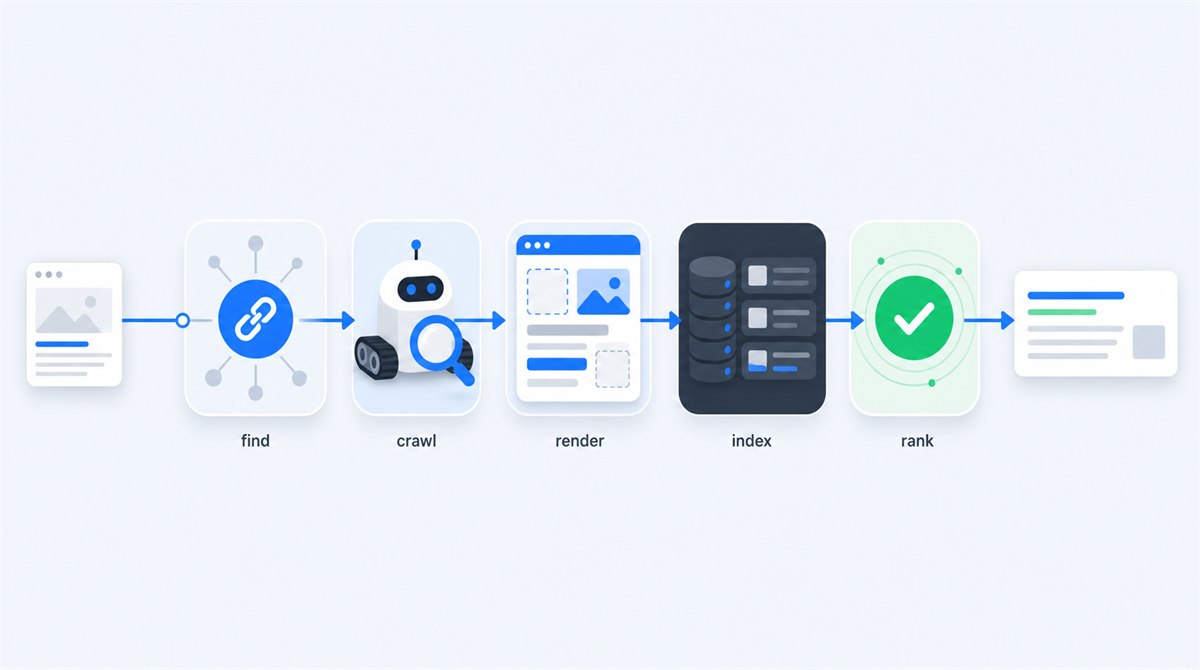
Google Search works by finding pages, fetching them, understanding what they contain, storing selected pages in an index, and retrieving the best matches when somebody searches. Those jobs are related, but they are not interchangeable. A URL can be known but never crawled, crawled but not indexed, indexed but never shown, or shown for one query and invisible for another.
To connect this search process to practical website work, read the beginner’s guide to technical SEO.
This distinction is the foundation of technical SEO. It explains why submitting a sitemap is not a ranking tactic, why a green 200 response does not guarantee indexing, and why searching your exact URL tells you almost nothing about whether the page can compete. Once you can name the stage, most mysterious SEO problems become ordinary diagnosis. The step-by-step SEO audit checklist turns that diagnosis into a complete site review and prioritized repair plan.
The Complete Search Pipeline
Google describes Search as three broad stages: crawling, indexing and serving search results. For diagnosis, it helps to split the first two stages into the smaller jobs you can actually inspect.
Find and fetch
Google discovers a URL through links or a sitemap, then Googlebot requests it.
Render and index
Google processes HTML, runs JavaScript when needed, understands the content and chooses a canonical.
Match and serve
For each search, Google retrieves indexed pages and orders the most useful, relevant results.
1. Discovery: Google Learns That the URL Exists
There is no central registry of web pages. Google maintains its own list of known URLs and continually adds to it. The main discovery routes are links from pages it already knows and XML sitemaps. A new page linked from your homepage or a frequently crawled category can be found naturally. An orphan page with no internal links might sit in a sitemap and still look unimportant.
Links do two jobs at once: they reveal the destination and provide context. The practical internal linking guide explains how to build those paths, while Google's link guidance recommends ordinary <a href="..."> links with descriptive anchor text. A clickable <div>, an element with only an onclick handler, or a URL hidden behind a form may work for a visitor while giving a crawler no dependable path.
A sitemap is a second discovery feed, not a replacement for navigation. It should list the canonical, indexable URLs you actually want in search. My XML sitemap guide covers the format and hygiene rules; the practical point here is simpler: a URL in a sitemap is a suggestion to crawl, not a promise to index.
What discovery problems look like
- A new page has no internal links and is missing from the sitemap.
- Important content is reachable only through site search or a filter form.
- JavaScript changes the screen but never creates crawlable URLs.
- Mobile navigation omits links that appear on desktop.
- An old sitemap still lists redirected, noindexed or deleted URLs.
2. Crawling: Googlebot Requests the Page
Once Google knows a URL, Googlebot may request it. Your server answers with headers, an HTTP status code and usually an HTML document. That response decides whether the journey continues. A clean 200 says content is available. A 301 or 308 sends the crawler elsewhere. A 404 says the resource is missing. A 5xx says the server failed.
Crawling is scheduled, not owed. Google chooses what to fetch and how often, while avoiding server overload. A healthy small website normally does not need to obsess over "crawl budget." It needs stable hosting, useful internal links, sensible URLs and no accidental traps that generate thousands of low-value combinations.
Your robots.txt file can stop Googlebot from requesting paths, but it cannot reliably keep a URL out of search because Google may still know that URL through links. If removal is the goal, allow crawling and use noindex, authentication, deletion or an appropriate response. The HTTP status code guide explains which response matches each situation.
3. Rendering: Google Builds What a Browser Would See
For a static page, the initial HTML already contains the heading, copy and links. For a JavaScript application, the first response may contain little more than a root element and script references. Google therefore renders pages with a modern Chrome-based system and processes the resulting HTML.
Rendering matters because visitors and crawlers can receive the same URL but end up with different usable content. A failed API call, blocked script, client-side redirect, lazy-loading bug or interaction-only component can leave Google with an incomplete page. Titles, canonicals, structured data and important links are safest when they are stable and visible in the rendered output. This is the specialist area usually called JavaScript SEO.
You do not need JavaScript to have a rendering problem. Cookie walls, consent managers, broken CSS, slow third-party resources and device-specific templates can all change what Google receives. Search Console's URL Inspection tool can show rendered HTML and a screenshot, which is far more useful than assuming that your own browser represents Googlebot.
For the JavaScript patterns that hide content or links from Google and how to test them, read the JavaScript SEO guide.
4. Indexing: Google Understands and Selects the Page
After crawling and rendering, Google analyzes the visible text, headings, title, images, links and other signals to understand the page. It also groups duplicate or very similar pages and selects a representative version called the canonical URL. The canonical is the version whose signals are generally consolidated and which may be shown in search.
This is why "crawled" does not mean "indexed." Google can fetch a perfectly healthy page and decide not to store that URL as a separate result. The page might carry noindex, duplicate another URL, point its canonical elsewhere, contain little useful information, or be part of a large set that adds no distinct value.
Your canonical declaration is a preference, not a command. Google can choose a different version when redirects, internal links, sitemaps and page content contradict it. The next guide, Canonical URLs Explained, shows how to make those signals agree.
Indexed can mean
- The page is eligible to appear
- Google selected this URL as canonical
- Google stored and understood enough content
- The URL may collect impressions for matching queries
Indexed does not mean
- The page ranks for its target keyword
- Google endorses or guarantees the content
- The page will stay indexed forever
- Every searcher sees the same result
5. Ranking and Serving: Google Answers a Specific Search
For a practical diagnosis after a page enters the index, follow the indexed-but-not-ranking workflow.
When somebody searches, Google does not scan the live web. It retrieves candidates from its index and orders results for that query. Relevance depends on the words and meaning of the search, the content and signals associated with each page, quality, location, language, device and many other systems. The search intent guide explains how to turn that likely user need into the right page type and answer.
Ranking is therefore query-specific. A page does not have one universal ranking. It may be position three for a precise question, position forty for a broad topic and absent for an unrelated phrase. Search Console averages can blur all of those query-page pairs into one misleading number.
Technical eligibility is only the entry ticket. A fast, indexable page with valid schema can still fail because it does not answer the search as clearly as competing pages. Likewise, strong content cannot rank if a canonical points elsewhere or Googlebot receives a server error. Sustainable SEO connects both halves: content that deserves the result and implementation that allows Google to use it.
How to Find the Stage Where a Page Is Stuck
- Confirm the URL resolves. Open it in a private browser window and check the final URL and status code. Redirects, login walls and server errors come first.
- Check crawl permission. Inspect robots.txt and any robots meta tag. Remember that a blocked crawler cannot see a
noindexrule inside the page. - Inspect the URL in Search Console. Compare the indexed result with a live test. Look at crawl status, indexing permission, rendered HTML, user-declared canonical and Google-selected canonical.
- Check discovery signals. Find the page in your sitemap and follow internal links to it. Make sure those links are ordinary anchors visible on mobile.
- Compare source and rendered content. Confirm the main copy, headings, links, title, canonical and schema exist after rendering.
- Evaluate distinct value. Compare the page with other URLs on your site. If two pages answer the same intent, consolidate rather than repeatedly requesting indexing.
- Check query evidence. Once indexed, use Search Console's Performance report. Impressions prove the page is being considered; no impressions can indicate weak relevance, insufficient demand or stronger alternatives.
If URL Inspection terminology is the confusing part, the page-not-indexed guide translates every major status and provides a step-by-step troubleshooter. If Search Console is not installed yet, start with the setup walkthrough.
The Misconceptions That Waste the Most Time
What helps
- Useful crawlable internal links
- Stable 200 responses and fast servers
- Canonical URLs aligned across every signal
- Content with a clear, distinct search intent
- One indexing request after a meaningful fix
What does not guarantee results
- Submitting a sitemap every day
- Searching
site:example.comas an index audit - Requesting indexing without changing the page
- Adding schema to weak or blocked content
- Paying anyone who promises faster Google crawling
Google explicitly states that it does not accept payment to crawl more frequently or rank higher. Ads can buy placement marked as advertising; they do not buy organic eligibility. Anyone selling a secret submission channel is selling a story.
Search Visibility Checklist
Follow the pipeline from left to right
- The page has at least one relevant, crawlable internal link
- The canonical URL appears in the XML sitemap
- The URL returns the intended 200 or redirect response
- Robots.txt allows crawling and no accidental noindex is present
- Main content, links and metadata appear in rendered HTML
- The self-referencing canonical matches internal links and sitemap URLs
- The page answers one distinct search intent better than nearby pages
- Search Console confirms the expected Google-selected canonical
Which Stage Is Costing Your Site Traffic?
A technical audit is the fastest way to separate discovery, crawling, rendering, indexing and ranking problems. Send me your site and I will trace the actual failure before recommending a fix.
Request a free reviewHow Google Search Works: FAQ

I'm a developer who moved into technical SEO. I audit the whole search pipeline, then implement the fixes myself: crawling, indexing, canonicals, rendering, structured data and performance. Request a free website review and I'll take a look personally.